
How to Connect Texting to Your Systems With SMS Integration
Texting is no longer just a simple way to send quick updates. Businesses now rely on communication via SMS to connect with customers and keep conversations active.
But without proper integration, messages can sit outside your systems and make it harder to track interactions.
SMS integration connects your business tools with a messaging platform to make sure every interaction is tied to your data. It’s easier to manage conversations and deliver better customer experiences without switching between tools.
In this article, we’ll break down how SMS integration works and how to set it up step by step. You’ll also see how it supports every stage of the customer journey, from first contact to long-term engagement.
TL;DR
- SMS integration works by linking your system to an SMS gateway and API, turning user actions into messages that can be sent, received, and tracked.
- There are multiple types of SMS integration, including CRM, internal communication, ecommerce, customer support, call center, and automation-based setups.
- You can use SMS integration for lead follow-up, marketing campaigns, appointment reminders, support messaging, and customer retention.
- Setting up SMS integration involves choosing the right platform, connecting your tools, organizing contacts, building workflows, and testing campaign performance.
- Textellent supports SMS integration with CRM connections, automation, API access, and tools that ensure your messaging is aligned with your workflow.
What Is SMS Integration and How Does It Work?
SMS integration links your systems to a messaging platform. You can send and receive bulk SMS messages from your customer relationship management (CRM) system, website, or web app.
It works by connecting your system to an SMS gateway, which acts as the bridge between your software and mobile networks.
- A user action, like a signup, booking, or new lead, triggers the process
- Your system sends a request through a single API to an SMS service
- The message is delivered to the user’s mobile phone as a confirmation, update, or promotion
- The customer replies, and your system can receive SMS messages and store them
- Your business replies or triggers automated follow-ups based on the response
When running a business, you will eventually use different tools to manage sales, support, and marketing.
SMS integration turns texting into a system-based process where every message is tracked, automated, and connected to your existing tech stack.
Types of SMS Integrations
You can use different types of integration based on how you operate and which tools you rely on. Here are the main types of SMS integrations you can implement.
CRM SMS Integration
Your CRM holds the most important data in your business, which includes your contacts, conversations, and sales activity. CRM SMS integration allows you to turn that stored data into real-time communication without leaving the platform you already use.
It also supports manual and automated messaging. You can follow up with leads right after they enter your system, send reminders, or continue conversations with active contacts.
The SMS provider you choose shapes how smoothly this setup runs. Textellent is the best text marketing platform if you want reliable SMS integration inside your CRM.
It connects with major platforms and keeps data synced, including contacts, notes, and message history stored within your contact lists.
Once connected, your staff can manage conversations, follow up with leads, and keep every message tied to CRM records.
Internal Communication SMS Integration
Your internal tools keep your business running day to day. But delays in communication can slow response time.
SMS integration with your internal systems allows your staff to receive updates instantly and act without switching platforms.
SMS can send alerts to your internal tools when a customer replies, submits a form, or requests support. Your staff stays informed and responds faster without checking multiple systems.
Textellent also supports this setup through its Chrome extension. The Textellent Messenger provides a no-code way to send messages from the applications your staff already uses. It includes access to past conversations, templates, and media.
Ecommerce SMS Integration
When running an ecommerce brand, you’ll need to manage orders, payments, and customer activity.
SMS integration allows your business to keep buyers informed and engaged through every step of the purchase process.
You can send SMS payment reminders, shipping updates, or follow-ups after a purchase. It also supports promotions for returning customers to keep engagement high after checkout.
Textellent supports ecommerce SMS marketing by letting you send texts with your store activity and trigger messages based on customer actions. You stay connected with buyers from checkout to delivery.
Customer Support SMS Integration
The customer support team handles customer issues, but long wait times and missed calls can create a poor experience. SMS gives customers another way to reach your business without relying only on voice calls.
Messages can be turned into tickets inside your help desk, so your staff can reply from one place and track every interaction. Customers can send questions and receive updates through text instead of waiting on a phone line.
Cloud Call Center SMS Integration
Your call system handles incoming and outgoing calls. However, not every customer wants to talk on the phone.
Adding SMS allows your business to follow up and continue conversations through text.
After missed calls, your system can send a personal message to check in with the customer. This gives users another way to respond without returning a call.
Textellent enables this setup by allowing you to use business numbers for both calling and texting. Customer communication stays connected and easy to manage.
Automation and SMS API Integration
Your business uses many tools, and connecting them manually takes time. API-based SMS integration allows your systems to work together through automation.
Textellent offers a powerful SMS API that supports advanced workflows, including SMS scheduling and event-based messaging. This allows your business to send the right messages based on actions inside your systems.
It also offers deep Zapier integration, which connects SMS with thousands of apps. You can set up workflows where actions in one system trigger messages automatically, without coding.
For website engagement, Textellent includes a Text Us Now widget that allows visitors to start conversations from your site using their mobile phone. It creates a fast way for potential customers to connect with your business without filling out forms.
Use Cases for SMS Integration
SMS integration supports different parts of your business. Here are some of the most common ways you use SMS in business situations.
Lead Response and Qualification
Speed matters when responding to new leads. SMS helps your business reach out right after someone shows interest.
A message can be sent as soon as a form is submitted on your website, which helps marketing teams connect with potential customers before they lose interest. Follow-up messages can also be scheduled to keep the conversation going.
Marketing and Campaign Messaging
SMS is a strong channel for promotional messages. You can send SMS campaigns to share product announcements, offers, and updates.
Messages can also be sent as bulk SMS to reach a larger audience at once, while still keeping communication simple and easy to read.
Appointment Reminders and Scheduling
Missed appointments can affect daily operations. SMS helps keep customers informed and prepared.
You can send appointment reminders before scheduled visits and follow up if someone misses their appointment. This helps reduce no-shows and keeps your schedule on track.
Customer Support and Notifications
SMS gives customers a simple way to reach your business without waiting for phone calls.
Customers can ask questions, and your system can receive text messages and route them to your support platform. Updates, alerts, and service notifications can also be sent through SMS.
Customer Retention and Ongoing Engagement
Staying connected with customers after a purchase helps build long-term value.
SMS lets you send personalized offers and follow-ups to loyal customers based on their past activity. This keeps your business top of mind without overwhelming your audience.
How to Get Started With SMS Integration
SMS integration brings your messaging into your business tools. Here’s how you can set up SMS integration for your business.
Step #1: Choose the Right SMS Integration Platform
You may want full integration with your CRM and website, or just a quick way to start sending messages.
The ideal SMS marketing platform should connect with the tools you already use and keep everything easy to manage.
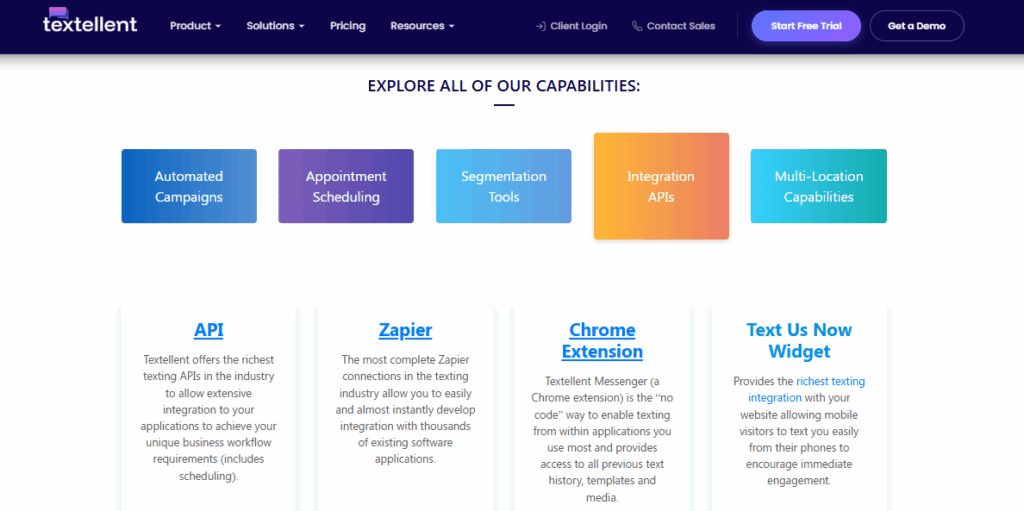
Textellent is a business texting platform that offers API access and integrations to support SMS workflows. You can connect it to your systems for automated workflows, or use it on its own for a simpler setup. Popular tools you can integrate with include:
- Salesforce
- Zapier
- RingCentral
- ActiveCampaign
- HubSpot
- Care.com
- Dialpad
- Gravity Forms
Textellent handles messaging in a more natural way. Messages are sent from real phone numbers instead of short codes, which makes it easier for people to reply and continue the conversation.
If you want to include images, it also supports MMS messaging to add more context when sharing updates, confirmations, or promotions.
Another strong feature of Textellent is its handling of follow-up. It can trigger messages based on actions such as new leads, form submissions, or customer activity.
If you want to see how Textellent fits into your setup, sign up for a free trial or book a demo today!
Step #2: Connect Your CRM or Business Tools
SMS integration works best when it fits into your systems, such as your CRM, website, or internal apps.
Once connected, your tools can trigger messages based on real actions. A new lead can receive a message right after submitting a form, or a customer can get an update after a purchase.
Textellent supports this through direct integrations and flexible SMS API connections. It can sync with your CRM and other tools to make sure contact data, message history, and activity are updated.
Step #3: Import and Segment Contacts
Start by importing your SMS lists and making sure each entry includes a valid phone number.
Clean data is important here, since accurate contact details make sure your messages reach the right people and responses are tracked correctly.
After importing, focus on SMS segmentation. Textellent supports advanced segmentation through tagging.
You can organize contacts based on preferences, history, events attended, or actions such as a purchase or inquiry.
Segmenting your contacts also improves how you manage outreach. It lets you send updates to active customers, follow up with leads, or target specific groups without mixing messages across your audience.
Step #4: Create SMS Workflows and Automations
Workflows connect your system actions to messaging. You can create simple workflows, such as sending a welcome message to new leads, or more advanced sequences that follow up over time.
Textellent supports this through flexible SMS automation tools that connect messaging with your system events. It lets you set rules for when messages should be sent, schedule follow-ups, and build sequences that guide conversations from first contact to conversion.
It also supports drip campaigns, where messages are sent over time based on actions like a new inquiry or a recent purchase. Your business stays connected with leads and customers without needing to track every step manually.
Step #5: Test and Optimize Campaigns
Before using SMS in your daily operations, it’s important to test how your setup performs. It helps you confirm that SMS campaigns are sent correctly, replies are captured, and everything works as expected.
Start by sending test messages to check delivery and timing. Make sure your system can receive messages and store them properly.
Next, review how your messages perform by looking at response rates and how users interact with your content.
Textellent provides tracking features that show how contacts respond, including clicks and conversions when links are included.
You can then update message content, timing, or audience segments to improve your results. Small changes can lead to better customer engagement and stronger outcomes over time.
Turn Disconnected Texting Into a Structured Process With Textellent
When your texts sit outside your CRM or require extra steps to manage, opportunities with your customers and clients can be missed.
Textellent brings SMS into your business tools, keeping every message, reply, and follow-up tied to your data. It connects with your CRM and automates responses based on real actions.
It can also manage conversations through a web-based platform where messages, contacts, and conversations stay synced across your tools and devices.
With API access and Zapier connections, you stay ahead while staying aligned with compliance standards and keeping communication consistent as your needs grow.
Sign up for a free trial or book a demo with Textellent today to see how you can start using SMS as a fully integrated part of your business!
FAQs About SMS Integration
How much does SMS integration cost?
The cost of SMS integration depends on the platform you choose and how many messages you send. Most providers charge per message or offer monthly plans based on usage.
SMS marketing costs can also vary based on features such as automation, integrations, and support for bulk SMS.
Some SMS services include options like toll-free numbers that can affect pricing depending on how your business handles messaging.
Is SMS integration secure?
SMS integration is secure when you use a trusted platform and follow proper data practices. Most providers protect message data and keep communication tied to your system.
Security also depends on how you manage customer information. Platforms that integrate with systems like Zoho CRM help keep contact data organized and controlled.
Can small businesses use SMS integration?
Even with a small team, SMS can support daily communication and outreach.
You can use it to manage communication, follow up with customers, and stay connected without needing a large setup.
Many SMS platforms offer flexible entry options for small companies, including free tools if you want to get started without a high upfront cost.
How long does it take to set up SMS integration?
Setup time depends on how complex your system is and how many tools you want to connect. A basic setup can be done quickly, especially if you use a platform with ready integrations.
More advanced setups that involve connecting systems like an ecommerce platform or working with an SMS gateway API may take more time. Once everything is connected, you can start sending messages.

Get Started with Business Texting
Simple to launch, built to scale. Try Textellent FREE for 14 Days
Start Free Trial