

Optimize Your Trello With an SMS integration

Textellent integration streamlines Trello (Support workflows) by automating customer communication, sending reminders, and centralizing support interactions for teams.

Making Trello Support Workflows Smoother for You

Easily connect Trello support workflows with Textellent’s business texting platform to automate updates, reminders, and customer conversations in one place.

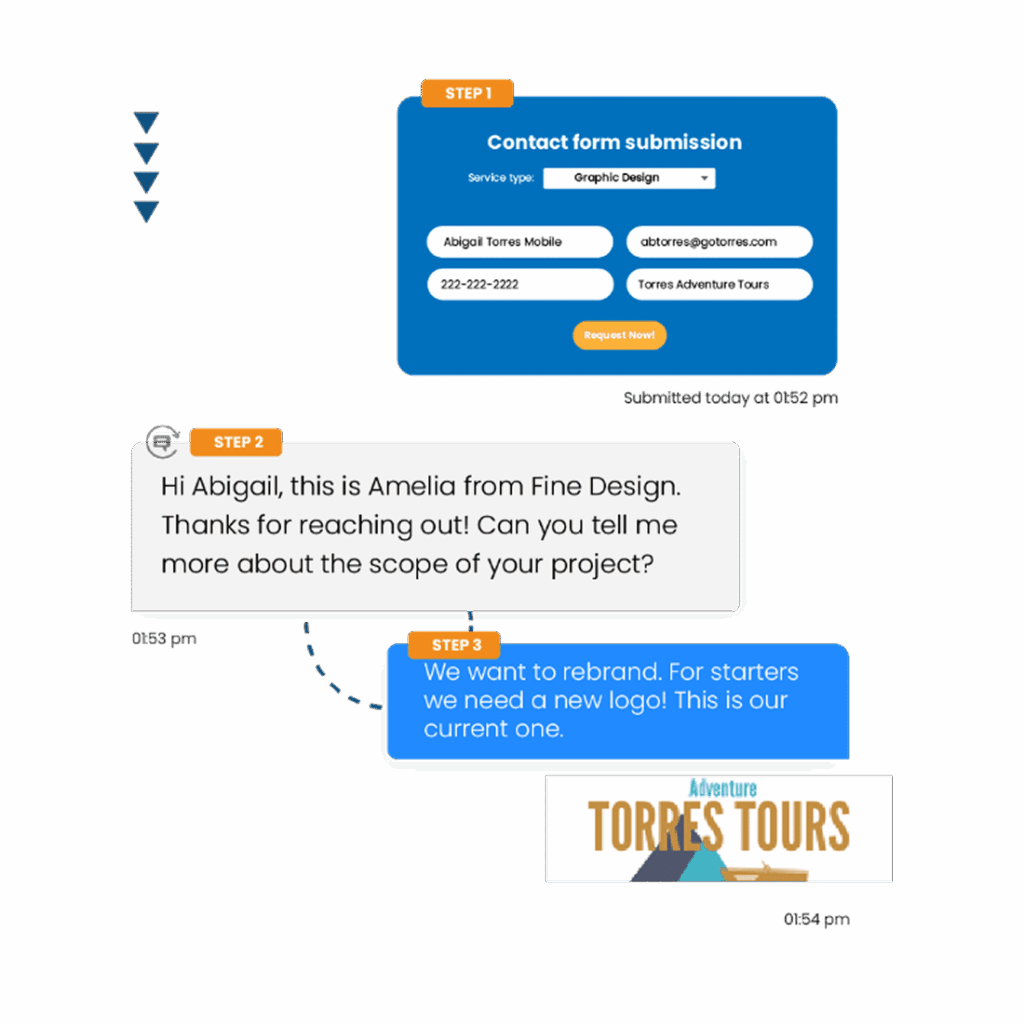
Send Support Updates via SMS

Send SMS updates about support tickets managed in your Trello workflows. Textellent helps you keep customers informed and engaged throughout the support process.

98%

of texts are read immediately

70%

of consumers want to text businesses

40%

of consumers said they have tried to text a business

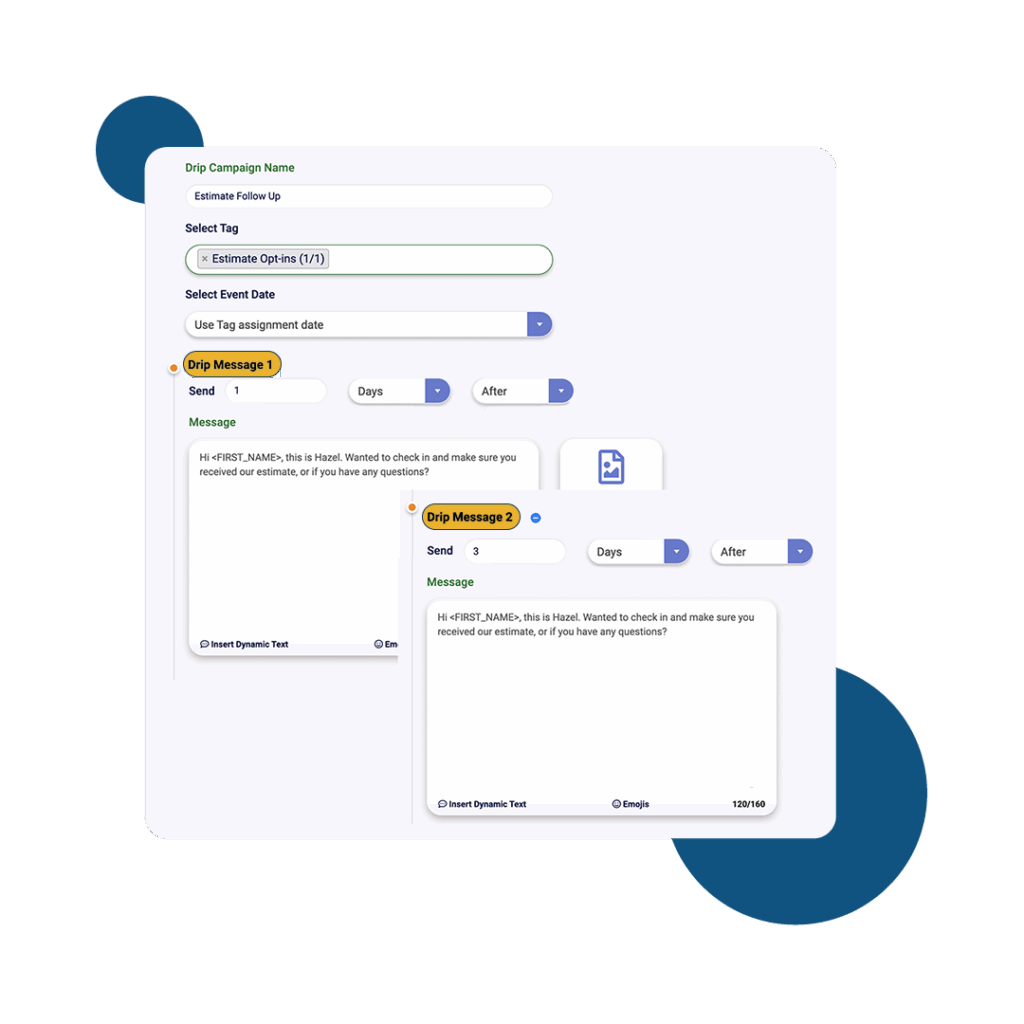
Trigger Drip Campaigns from Support Cards

Trigger personalized drip campaigns from your Trello support workflows with Textellent, helping you nurture customer relationships and drive ongoing engagement after support interactions.

Everything You Need to Scale SMS

Read Our Blog

How to Use B2B SMS Marketing for Effective Lead Generation

How to Use B2B SMS Marketing for Effective Lead Generation

Learn how to effectively carry out B2B SMS marketing and help your business communicate more efficiently through text…

Read More →
Keep Your Communication Steady With Group Text Messaging

Keep Your Communication Steady With Group Text Messaging

Explore business use cases for group text messaging and learn how to set it up for your communication…

Read More →
15 Promotional Message Examples to Capture Customers

15 Promotional Message Examples to Capture Customers

Customers decide whether to engage with your brand in just a few seconds. That’s why your promotional texts…

Read More →

READ

OUR BLOG

woman sending a message

How to Use B2B SMS Marketing for Effective Lead Generation

Learn how to effectively carry out B2B SMS marketing and help your business communicate more efficiently through text messaging.
group text

Keep Your Communication Steady With Group Text Messaging

Explore business use cases for group text messaging and learn how to set it up for your communication efforts. Discover how Textellent can help.
Woman reading an SMS on her phone

15 Promotional Message Examples to Capture Customers

Everything You Need to Text at Scale

  • Textellent Messenger

    The Textellent Messenger is a Chrome extension that lets your team text inside the apps you already use—no code, no tab-switching. View full conversation history, reuse approved templates and media, and keep replies organized in a shared inbox.

    Learn More >
  • Integrate SMS

    Textellent integrates with 800+ apps—CRMs, schedulers, forms, and payment platforms—so data flows in and texts go out at the perfect moment. Map fields once, tag contacts consistently, and keep systems in sync.

    Learn More >
  • Automations

    Turn common events into automatic SMS touchpoints: new leads, appointments, payments, status changes, and more. Build simple, rules-based flows that send the right text and follow-ups without manual work.

    Learn More >
  • Franchisor Module

    The Franchisor Module gives franchisors clear visibility across locations while empowering franchisees to execute consistent, on-brand texting that drives growth. Scale what works and spot where support is needed—fast.

    Learn More >
  • AI Rewriter & Translate

    Instantly polish your texts and translate them into different languages, making communication faster and more accessible.

    Learn More >
  • Mobile App

    Keep conversations moving on the go. The Textellent Mobile app brings your shared inbox to iOS & Android with real-time push notifications, quick-reply templates and media, conversation assignment, and full sync to your CRM—so nothing slips through when you’re away from your desk.

    Learn More >

Get Started with Business Texting

FAQs About Trello (Support workflows) Integration

How can I sync Trello card updates with Textellent messages?
Sync Trello card updates with Textellent messages by using an integration tool like Zapier to automate SMS notifications for workflow changes.
How do I track SMS replies in Trello support workflows? +
Track SMS replies in Trello by integrating an SMS platform like Textellent and syncing replies as Trello card comments or activity logs.
Can I automate SMS follow-ups based on Trello card status? +
Yes, you can automate SMS follow-ups based on Trello card status by integrating Trello with a business texting platform like Textellent.
Can I assign SMS conversations to specific Trello support team members? +
Trello does not natively support assigning SMS conversations to specific team members, but integrations or Power-Ups may offer this capability.