
SMS vs Text Message: What’s the Difference?
Is your business using “SMS” and “text message” as if they mean the same thing?
You’re not alone. Most teams don’t think twice about it. Texting has become the go-to way to communicate, especially compared to phone calls.
But when you look a little closer, SMS and text messages may sound the same, but they’re used in different ways.
Knowing the difference helps you choose how to communicate with customers and keep things clear as you scale.
In this article, we’ll break down what SMS and text messages really mean and how they differ.
TL;DR
- “SMS” and “text message” are often used interchangeably. SMS is text-only, while a text message includes SMS, MMS, and app-based messaging.
- The difference becomes important in business, since it affects how messages are sent, what you can include, and how customers receive them.
- SMS is best for short, time-sensitive updates like reminders, order confirmations, and verification codes.
- When you need more than that, text messaging lets you handle conversations, send messages to groups, and include images or links.
- Textellent brings everything together, so you can manage conversations, send campaigns, and follow up without jumping between tools.
What Is SMS?
SMS stands for short message service. It is a type of messaging built for sending short, text-only messages between mobile devices.
It works on nearly every mobile phone and does not rely on internet-based apps in the same way other messaging platforms do. The widespread availability of SMS stems from its use of cellular or regular mobile networks.
Due to the character limit, SMS messages are naturally short and direct. This makes them useful for sending quick updates like reminders, alerts, confirmations, and one-time codes.
SMS remains one of the most reliable ways to send messages. It’s also built on early GSM standards, which is why it continues to work reliably in nearly all mobile devices today.
This foundation is part of what makes SMS technology so consistent.
How SMS Messages Work
Mobile carriers handle SMS messages over the telephone network and send them straight to the recipient’s device. Messages can still get through even in locations with poor connectivity because it does not rely on apps or the internet.
That’s a big reason businesses rely on SMS for time-sensitive updates and customer communication.
What Is a Text Message?
A text message is a general term people use for messages sent from a phone.
It can include different formats. The most common is SMS, which is plain text. It can also include messages with pictures, videos, or other forms, depending on the device or app being used.
Text messages can go through mobile networks or use an internet connection, such as Wi-Fi or mobile data.
Most people don’t think about the difference. If someone says “send me a text,” it could mean any of these message types.
That’s why most people prefer texting because it’s fast and easy. It is widely used to communicate with customers, friends, and contacts.
Types of Text Messages
Text messages come in a few common formats:
- SMS – Simple text-only messages sent through mobile networks. No internet needed.
- Multimedia messaging service (MMS) – Lets you send images, videos, audio, and larger files.
- Rich Communication Service (RCS) – RCS messaging adds features like read receipts and typing indicators.
- iMessage and app-based messaging – Apps like iMessage, WhatsApp, and Facebook Messenger use the internet and support media, group chats, and more.
What’s the Real Difference Between SMS and Text Messages?
Here’s the simple takeaway.
SMS is a specific type of message. It’s a text-only message sent through mobile networks, while a text message can include SMS along with other formats like images or app-based chats.
In everyday use, people often treat SMS and text messages as the same. The difference becomes more relevant in a business setting.
Does the Difference Matter for Businesses?
In most cases, it matters.
The goal of basic communication is to get in touch with customers quickly and make sure that messages are easy to read. But as your messaging grows, the format affects what you can send and how customers receive it.
A clinic may rely on SMS for quick updates, whereas a retail store may employ photos in messages for promotions or marketing.
This affects the tools you use for SMS marketing, especially when sharing order confirmations, updates, and other important information.
Most consumers are easy to reach through text messaging. According to the Pew Research Center, shows that 97% of U.S. adults own a cellphone, and over 85% use smartphones.
Knowing the difference helps you pick the right way to communicate with your customers.
When SMS Makes the Most Sense (With Examples)
If you need to provide an immediate update, SMS is your best bet. It works well for short, direct messages that don’t need images or extra detail.
Most businesses use SMS for simple, one-time updates. It’s still the most common form of a single text message for this type of communication.
Here are a few common use cases with example messages:
- Appointment reminders – “Reminder: Your appointment is tomorrow at 2 PM.”
- Order confirmations and updates – “Your order has shipped. Track it here: [link]”
- Verification codes – “Your code is 482913.”
- Payment reminders – “Reminder: Your payment is due today.”
- Quick replies and alerts – “We’re running late by 10 minutes.”
These types of messages are short, direct, and easy to act on. That’s why SMS is often used when timing and clarity are the priority.
When a Broader Text Messaging Strategy Makes More Sense
SMS works well for one-time updates. But most businesses need more than that as conversations grow.
A broader text messaging approach helps you manage ongoing communication, not just single messages.
For example, you may need to handle two-way conversations with customers instead of sending one message at a time. You may also need a shared inbox so your team can see and reply to messages in one place.
As your list grows, sending mass text messages becomes part of your process. This includes marketing campaigns, updates, and follow-ups sent to groups, not just individuals.
You may also want to send longer messages, include links, or send multimedia when more detail is needed.
Another factor is SMS automation. You do not have to do everything manually. You may schedule follow-ups or send communications based on what your customers do.
This is where a broader setup makes sense. It supports ongoing conversations, keeps messages organized, and helps you stay consistent as your communication grows.
Keep Business Texting Simple With Textellent
When you own a business, you have to deal with a lot of messages all the time. It can be a quick question, a follow-up, or a real business opportunity.
When those messages are spread across phones, email, and different tools, it gets hard to keep track.Textellent keeps all of your business texts in one place, so you do not have to switch between apps to reply.
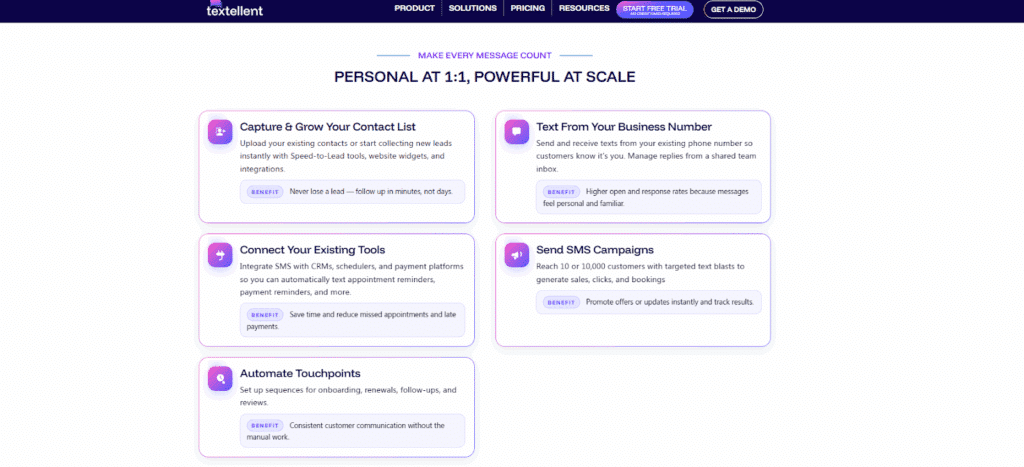
You can text one-to-one from your existing business number, so customers reach you the same way they always have.
Everyone on your team can view every message in a shared inbox, so they can answer quickly and see the whole conversation.
You can set up reminders or check-ins to happen automatically based on the time or an event if you send the same kinds of messages a lot. That keeps the lines of communication open, even when your team is busy.
Instead of messaging one person at a time, you can send SMS campaigns to reach a group. This works well for updates, marketing promotions, or quick announcements.
When someone replies, the conversation stays open. You can respond, confirm details, or move things forward in the same thread.
You can change the tone or language of a message quickly with the AI Rewrite and Translate feature without having to start over.
Textellent also connects with 800+ apps, so your contacts, schedules, and data stay in sync with the tools you already use.
It’s not just about sending messages. It helps you remember what people said, stay on top of follow-ups, and talk to customers in a way that fits into your daily work.
Bring SMS and Text Messaging Into One Place With Textellent
The difference between SMS and text messaging may not seem like much, but it alters how your business communicates.With Textellent, your team can stay on top of both basic updates and continuing conversations without having to switch tools or lose track of messages. It supports both simple SMS and more complex text messaging.
Sign up for a free trial or request a demo to see how business texting can work for you.
FAQs About SMS vs Text Message
Can businesses automate text messages?
Yes. Businesses can automate SMS, MMS, and in some cases RCS messages for reminders, updates, and follow-ups. This helps handle quite a bit of communication without sending each message manually.
Do text messages work the same on all devices, like iPhones and Androids?
Not precisely. Sending and receiving text messages and multimedia messages is possible on nearly all phones. Depending on the device or user settings, certain texting formats, such as iMessage on an iPhone, may act differently and require an internet connection to function.
What is the difference between SMS and MMS in text messaging?
SMS is used for text-only messages, while MMS allows you to send images, videos, and other media. When people talk about SMS and MMS, they are referring to different ways text messages can be sent depending on the content.

Get Started with Business Texting
Simple to launch, built to scale. Try Textellent FREE for 14 Days
Start Free Trial