How an SMS API Works For Business Texting In 2026
When communication depends on manual effort, it creates pressure on your team and increases the chance of delays or missed messages.
An SMS API lets you send and receive text messages through your existing systems. It connects your CRM or business application to a reliable SMS marketing service, so messages go out based on real-time activity.
In this article, we’ll explain how different industries use text messaging APIs and walk through the steps to integrate one into your current systems using the best SMS API platform.
TL;DR
- An SMS API is a software interface that lets your systems send and manage text messages automatically, triggered by customer actions or events.
- They’re used across industries to simplify customer communication for bulk SMS campaigns, reminders, support updates, and account security.
- A strong SMS API offers delivery tracking, message personalization, two-way messaging, and built-in compliance tools.
- Integration is simple with most APIs. You choose an SMS provider, access credentials, configure requests, run tests, and start sending.
- Textellent delivers a business-ready SMS API with fast integration, automation features, and support for over 800 connected apps.
Why Use an SMS API?
The difference between a satisfied customer and a lost opportunity comes down to timing and reliability.
Customers expect quick responses and reminders that fit their schedules. An SMS API meets these needs by creating an automated bridge between your business systems and your audience.
When you send through an Application Programming Interface (API), your messages are delivered fast and recorded. This helps you keep every interaction sharp, especially for appointment-based services, service updates, or time-sensitive promotions.
It also reduces the amount of repetitive work across your business. Instead of tracking messages manually, the API responds to actions within your CRM, calendar, or service tools. You maintain accuracy while giving your team more time to focus on higher-value tasks.
Scalability is another benefit. As your SMS traffic grows, a well-built API ensures consistent delivery and proper routing, no matter how many messages you send per day. It can also support multiple languages so that you can reach diverse audiences.
With a texting solution like Textellent, you manage messaging at scale without losing control over timing, tone, or content. Sign up for a free trial or request a demo consultation today!
Use Cases for SMS APIs
Below are examples of how businesses in different sectors apply SMS API technology to improve campaign performance and customer service.
Marketing Campaigns and Promotions
SMS campaigns are rarely missed. Open rates for texts consistently outperform email, and response times are faster.
When you connect your marketing system to an SMS API, you can send SMS campaigns based on customer behavior, purchase history, or key milestones.
Timing matters, and manual SMS scheduling leaves too much room for delay or error. The API removes that risk since promotions go out at the moment a condition is met, like when someone abandons a cart.
With text messaging services that support SMS and MMS, you can also send images to boost customer engagement and drive more sales from your campaigns.
Appointment Reminders and Alerts
Missed appointments create disruption across your business. Using an SMS API to set up appointment communication helps prevent those gaps by making reminders automatic.
Once integrated with your scheduling or booking system, the API triggers a message as soon as a new appointment is confirmed. The message is delivered to the customer’s mobile devices, confirming the date, time, and location.
As the appointment date approaches, follow-up messages can be scheduled based on timing rules you set. A reminder might go out the day before. A check-in notice might be sent an hour in advance.
If rescheduling becomes necessary, you can include a direct link or contact option, which allows the customer to act without calling your office. These real-time updates help reduce no-shows and improve customer experiences.
Two-Factor Authentication
Security is now a core part of the user experience, especially for businesses that handle personal data, financial information, or account-based services.
Two-factor authentication (2FA) adds an extra layer of protection by requiring users to verify their identity with a second step, usually a code sent by SMS.
When connected to your authentication system, the SMS API sends a one-time passcode (OTP) as soon as the user begins a login or attempts a high-value action such as transferring funds or changing account settings.
Customer Support and Notifications
When customers open a support ticket, request a service, or wait for an update, delays in communication create frustration. An SMS API helps you deliver automated notifications to the customer’s phone.
As support requests move through your system, the API can send alerts based on status changes. A message goes out when a ticket is opened, another when it’s assigned, and a final one when it’s resolved.
SMS customer service automation keeps customers informed during longer wait times by sending progress updates or estimated response windows. It also gives your support team more room to focus on resolving issues rather than managing follow-ups.
You can also trigger post-resolution surveys or follow-up messages through one API, which gives teams better control over the experience. SMS platforms that support campaign registry help ensure these notifications remain compliant, especially in regulated industries.
Internal Collaboration
Internal communication is just as important as reaching customers. When your teams are dispersed or managing time-sensitive work, delays can disrupt your whole operation.
You can use the API to send updates triggered by scheduling systems, HR tools, or internal platforms. If a shift changes, the assigned employee is notified immediately. If a job is added to a technician’s queue, the details are sent instantly.
This type of messaging works well across multiple languages. If you manage staff across various locations or in the field, multi-location marketing helps maintain structure and accountability.
Features That Matter in an SMS API Platform
When choosing an SMS gateway API, you need a system that fits into your operations, meets your messaging needs, and supports the kind of communication your business depends on.
While most SMS platforms offer basic delivery, the features listed below determine how much value you actually get.
Quick Deployment and Integration Options
The faster your SMS API connects to your systems, the sooner you can put it to work.
A single API offers REST-based architecture, clean documentation, and compatibility with common platforms like CRMs, scheduling tools, and custom applications.
Fast deployment accelerates productivity and helps reduce costs tied to long development cycles and delayed rollouts.
Support for Local and Toll-Free Numbers
The type of phone number used affects deliverability, response behavior, and how your brand is perceived.
A quality SMS API platform allows you to use long codes, toll-free numbers, or dedicated short codes based on your communication needs.
A flexible SMS gateway will support all three, so your business can align your strategy with customer expectations and geographic reach.
Some platforms also offer optional voice capabilities through toll-free numbers for call-forwarding or fallback options.
Message Tracking and Status Feedback
Understanding how your SMS API works is essential to improving results. Delivery receipts, open status, and error codes feed into your real-time analytics to optimize future campaigns.
A strong SMS API platform provides full visibility into message performance, so that you can analyze trends and correct delivery issues across carriers or contact lists.
Drip Campaigns and Scheduled Texts
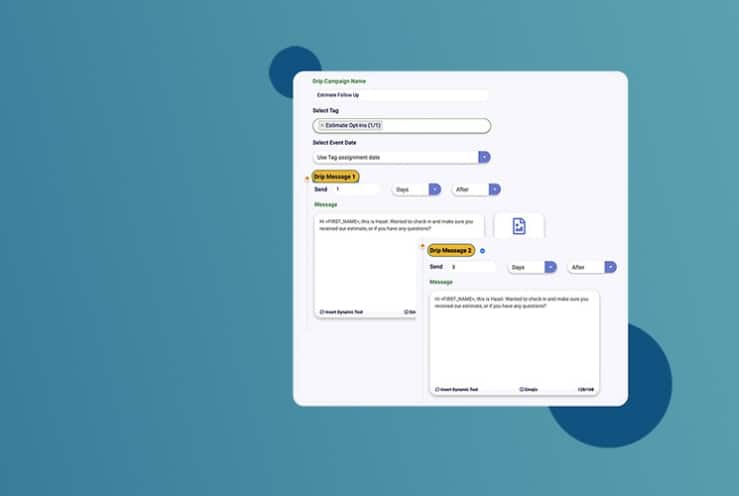
Not every message should go out at once. SMS drip campaigns let you plan a sequence of marketing messages based on timing or behavior. This works well for onboarding, sales outreach, or lead nurturing.
Scheduled text messages are also valuable for follow-ups, renewal notices, or appointment reminders. These tools should be built into the API framework, so you don’t need separate campaign software to manage customer communication over time.
Compliance Tools
Regulations like the Telephone Consumer Protection Act (TCPA) make it necessary to track consent and give recipients a way to opt out.
Your SMS API platform should support keyword-based SMS opt-outs (such as “STOP”), maintain audit trails, and help enforce message limits by region or use case.
High Delivery Rates and Routing Intelligence
Message delivery depends on more than the content. Routing, carrier relationships, and traffic volume all affect whether your texts arrive.
A reliable API uses smart routing paths and carrier-level monitoring to avoid delays or blocks. This protects your outreach and reduces the risk of delivery gaps during campaigns or system alerts.
How to Integrate an SMS API
With the right provider, you can connect messaging to your CRM, scheduling tool, or internal platform. Below is a general step‑by‑step process you can follow to connect an SMS service with your tools and systems.
Step 1. Choose an SMS API Provider
A reliable SMS API provider shapes every part of your communication process. Textellent offers a business-focused platform built for marketing and operational messaging.
This SMS platform offers an API that connects your business systems to its messaging engine. You can send and receive SMS based on real-time triggers from your CRM or other internal platforms.
The API supports personalized message templates, automated workflows, and SMS compliance features like opt‑out and consent tracking. It also manages replies and SMS delivery status, with routing optimized for fast delivery across devices and regions.
Textellent supports over 800 connected apps, giving you global coverage while reducing setup complexity. Whether you’re sending product announcements, confirmations, or reminders, the system ensures the right message reaches your audience on time.
Textellent offers a competitive SMS pricing structure that aligns with your messaging volume and growth goals. Sign up for a free trial or request a demo consultation today!
Step 2. Get API Credentials and Documentation
Once you choose a provider and complete registration, you need secure access credentials. With Textellent, you will receive API credentials, such as API keys or tokens, that authorize your system to send messages through the platform.
These credentials are required in every API request to confirm the source of the message and prevent unauthorized use.
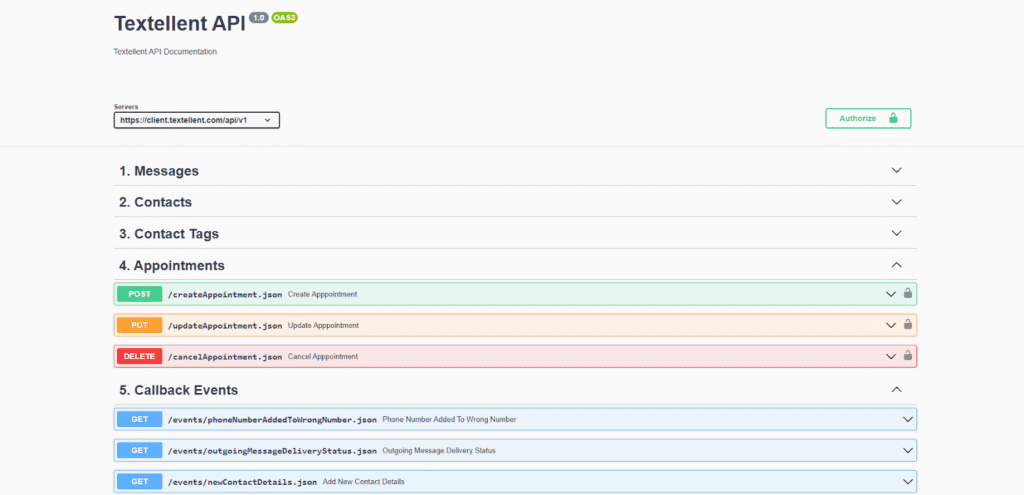
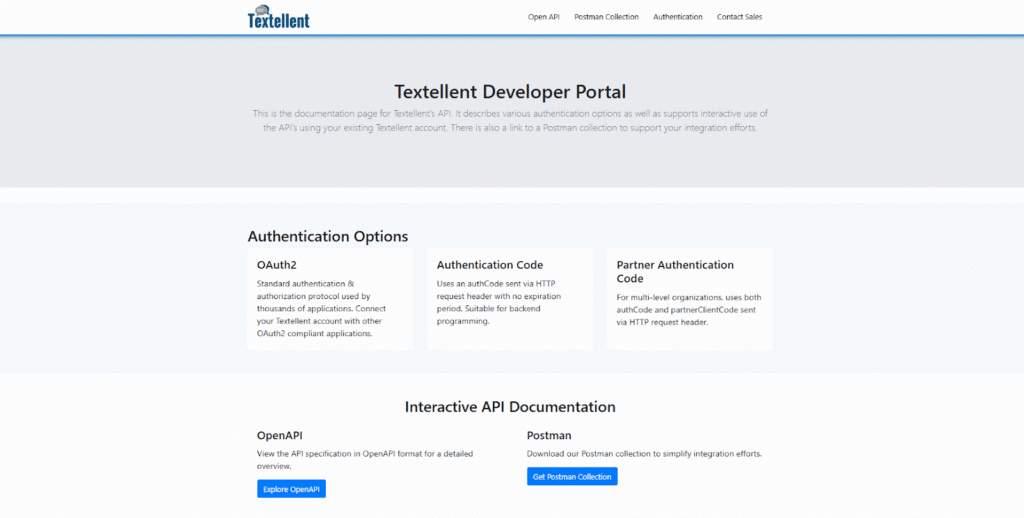
Textellent also provides a developer portal with full API documentation and an OpenAPI reference that outlines available endpoints and authentication methods. The documentation includes a Postman collection that speeds up setup and testing.
Step 3. Set Up REST API Requests
With your API credentials and documentation in hand, you can begin building requests that send SMS messages.
Many teams start with tools like Postman to craft API calls before adding them into code. You specify key information in each request, such as the recipient number, sender ID, and message content.
Textellent allows you to personalize, schedule, and send SMS and MMS messages. This is essential if your communication involves longer messages or promotional campaigns that need rich content.
Step 4. Test Your Integration
Before launching to your full audience, you need to test your configuration with real message flows. You may send test texts to sample numbers to check that:
- Messages arrive correctly
- Personalized fields display as expected
- Delivery status and error codes are returned accurately
- Opt‑out requests are processed
Testing also includes verifying how your integration handles invalid numbers, high message volume, and SMS timing. You need to confirm that your system captures delivery feedback and logs it properly so you can monitor any issues.
Step 5. Go Live and Monitor Performance
After testing is complete, you can switch to live mode and begin sending messages to actual customers or team members. You have to review message logs, delivery status, and response rates to verify that the integration is performing as expected.
You’ll be able to view message history, track delivery rates across global carriers, and measure campaign results in real time. This lets you fix issues and continuously improve your communication performance.
Textellent’s API supports global scale, which provides you the flexibility to grow across markets without needing additional systems.
Integrate SMS Into Your Workflow in Minutes—Try Textellent!
If your business depends on consistent communication, your messaging process shouldn’t be held together by manual effort or disconnected tools.
Textellent’s SMS API gives you a direct connection between your systems and your customers. From appointment confirmations and follow-ups to secure alerts and targeted campaigns, everything is handled automatically using the data you already have.
You can trigger SMS marketing messages from your CRM or internal workflows, all personalized and delivered in real time. This platform helps you strengthen customer relationships and maintain consistent touchpoints.
With powerful features like two-way messaging, opt-out management, and support for multiple languages, you gain structure without adding complexity.
If your current process slows you down or leaves gaps in follow-up, it’s time for a smarter approach.

Sign up for a free trial or request a demo consultation with Textellent and see how it can support growth across every part of your business!
FAQs About SMS APIs
Can I receive SMS messages sent via API?
Yes. Most SMS APIs support two-way SMS, which allows your system to send and receive SMS.
You can capture replies from customers and use response data to trigger next steps, such as confirming appointments or capturing opt‑ins. Two‑way support helps you manage both outgoing SMS notifications and inbound replies.
How secure is SMS API communication?
A dependable SMS API depends on secure protocols like HTTPS and token-based authentication to protect message data. While SMS itself isn’t encrypted end-to-end, the API ensures secure delivery between your application and the messaging provider.
How do I track message delivery?
Modern SMS APIs provide delivery status information. When your system sends a message, the API returns status codes indicating whether the message was delivered, failed, or is pending.
Many providers let you query delivery reports programmatically or view them in a dashboard.
Can I test an SMS API before committing to a paid plan?
Yes. Some providers offer a free SMS API trial so you can evaluate features before making a purchase. During the trial, you’ll have access to its main texting functionality and may be able to explore setup examples using sample apps provided in the developer documentation.

Get Started with Business Texting
Simple to launch, built to scale. Try Textellent FREE for 14 Days
Start Free Trial