
 Chrome & Edge Extension

Textellent Messenger
Chrome & Edge

Text inside the apps you already use — no code, no tab-switching. See history, use templates & media, and manage replies in a shared inbox.

Core Feature

Text from Any Web Page,
CRM, or Web App

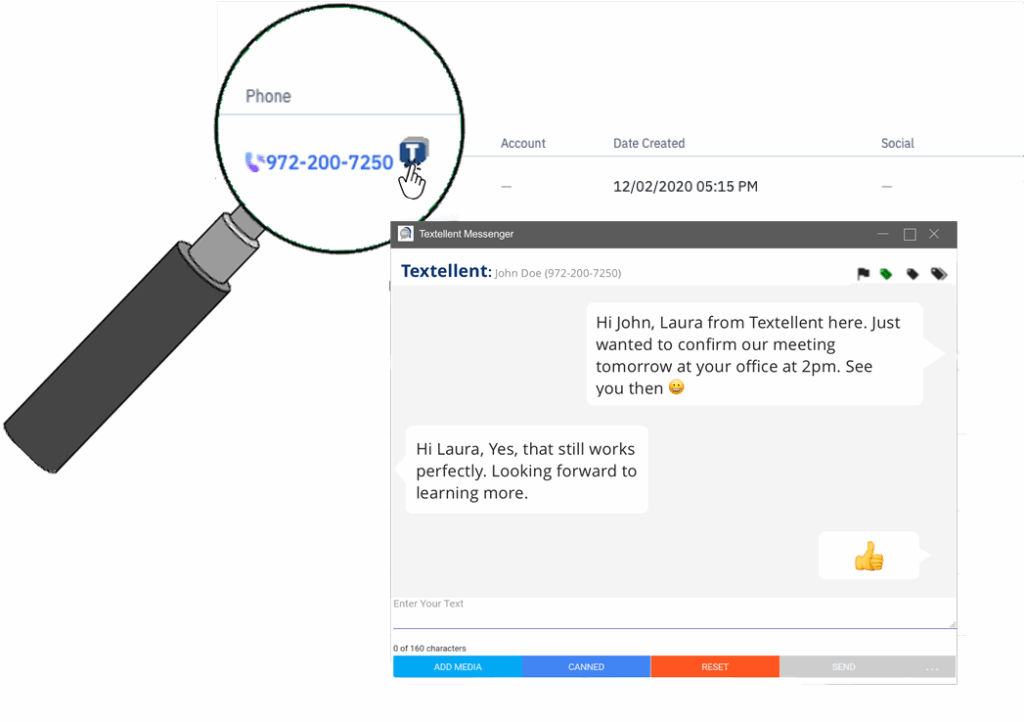
With Textellent Messenger, your team texts customers directly from the pages they already work in. Click the text icon next to a contact to see the full conversation history and send new messages via your text-enabled business number — without switching screens.

Capabilities
1
Text any mobile number directly from any web page using Chrome or Microsoft Edge.
2
Automatic phone number detection in your browser/CRM.
3
Texts send/receive via your text-enabled business number (Textellent can enable your toll-free, landline, or VoIP, or provide a new number).
4
Sync across web, CRM, and (optionally) your phone — without a new phone app.
5
Templates, media, links for scheduling, estimates, confirmations, surveys, reviews, referrals, and more.
Textellent Messenger — text from CRM
Simple Process

How it works

1

Click the text icon

Next to any detected phone number in your CRM or web app. Opens the Textellent Messenger panel without leaving your page.

2

Review history & compose

See full conversation history and send a message or reuse an approved template — all without switching browser tabs.

3

Send & sync automatically

Messages go via your text-enabled business number and sync to web, CRM, and your phone automatically.

Getting Started

Requirements & Setup

Up and running in under 5 minutes.

Requires an active Textellent account. Sign up ›
Install the extension on Chrome or Edge. Install on Chrome ›
After installing the extension, sign in with your Textellent credentials.
Choose an existing text-enabled business number or have Textellent set one up.
FAQs

Frequently Asked Questions

?
Do I need a Textellent account?
Yes — the extension connects to your Textellent workspace. Start your free trial ›
?
Does it reveal my personal number?
No — messages use your text-enabled business number. Your personal number is never exposed to customers.
?
Which numbers can be text-enabled?
Toll-free, landline, or VoIP — or you can get a new dedicated number through Textellent.
?
Which CRMs does it work with?
Works in Chrome and Chrome-based web apps — any page where the extension can detect phone numbers.
?
What if I want to send a text to a new number?
Click on the messenger icon from your plugins and that will give you the chance to enter your new number.
?
Will my whole team see conversations?
Yes — all messages sync to a shared inbox. Every team member sees the full conversation history in real time.